How to Buy a Genuine Laptop in Sri Lanka: Warranty, Grey Imports & Red Flags
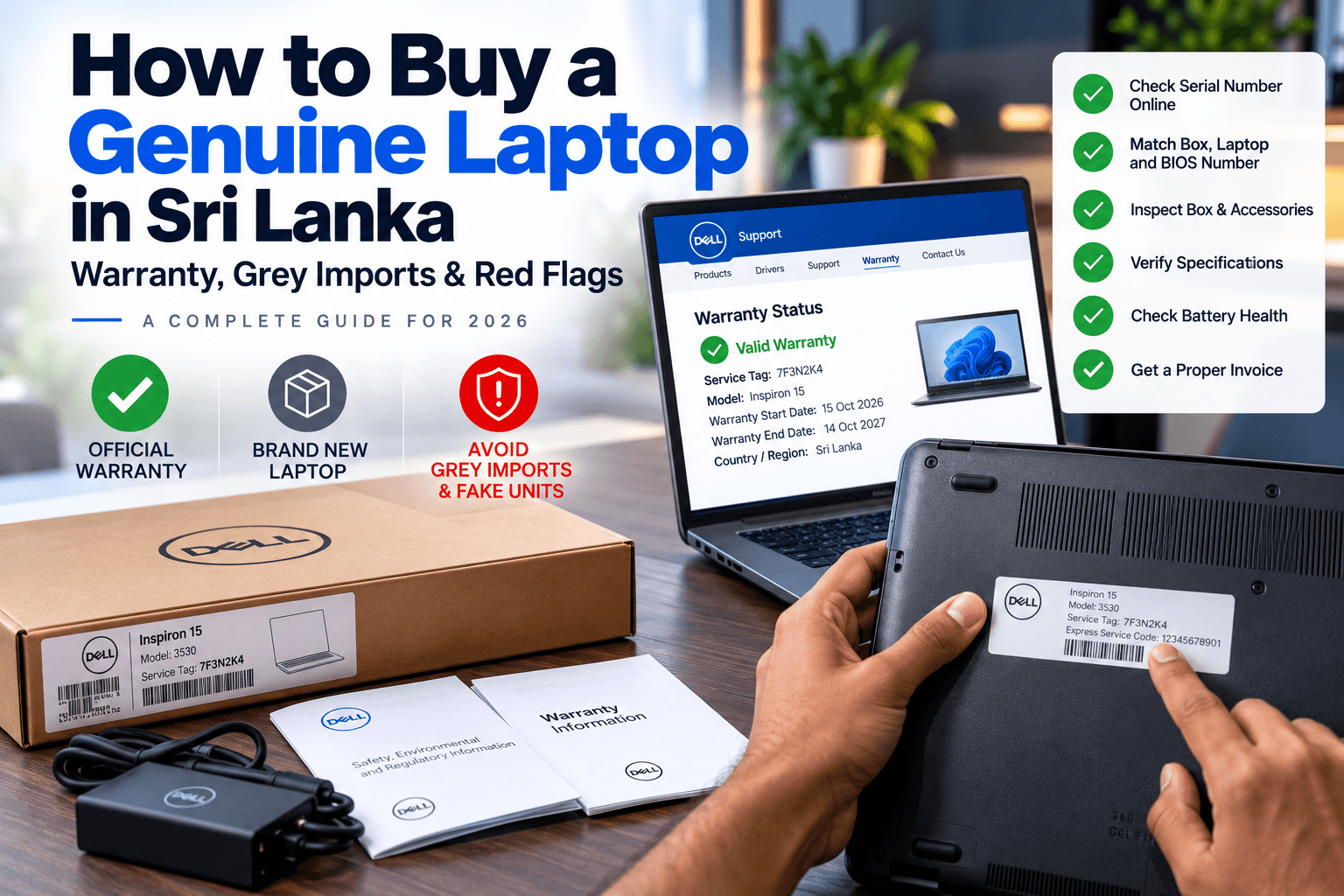
Key Takeaways
- Always check the laptop's serial number on the manufacturer's official warranty website before or right after purchase.
- Grey-import laptops may be cheaper but often lack valid local warranty, so repairs can become expensive.
- Red flags include prices far below the market, missing invoices, opened boxes and warranty that is "shop only".
- Buy from an established seller with a physical showroom, proper invoices and clear warranty terms.
Sri Lanka's laptop market is competitive, which is great for buyers. Unfortunately, it also means some sellers cut corners: grey imports, refurbished units sold as new, and "warranty" that only exists on a sticker. A laptop that looks like a bargain can become very expensive the moment something goes wrong.
This guide shows you exactly how to verify a genuine laptop, what different warranty types mean in Sri Lanka, and the red flags to watch for.
Genuine, Grey Import and Refurbished: What Is the Difference?
| Type | What It Means | Warranty | Risk |
|---|---|---|---|
| Genuine (local stock) | Brand-new unit imported through official or authorised channels | Valid manufacturer warranty in Sri Lanka | Low |
| Grey import | Brand-new unit imported privately from another country | Manufacturer warranty may not be honoured locally | Medium to high |
| Refurbished / Used | Previously used or returned unit, repaired and resold | Usually shop warranty only, if any | High |
| Counterfeit parts | Genuine shell with replaced or fake components (RAM, SSD, battery) | None | Very high |
Grey-import and refurbished laptops are not always bad, but they must be clearly described as such, and the price should reflect the higher risk.
Why Official Warranty Matters So Much
Laptop repairs in Sri Lanka can be costly, especially for parts priced in US dollars:
- A replacement motherboard can cost a large share of the laptop's price
- Display panels and batteries are expensive and sometimes hard to find
- Gaming laptops work hard and are more likely to need service
With valid manufacturer warranty, these repairs are covered. Without it, you pay the full cost yourself.
 Laptop motherboard repair covered by official warranty
How to Verify a Genuine Laptop: Step by Step
1. Check the serial number online
Every major brand has an official warranty-check website:
- HP: HP Support, Check Warranty
- Dell: Dell Support, enter the Service Tag
- Lenovo: Lenovo PC Support, Warranty Lookup
- ASUS: ASUS Support, Warranty Status Inquiry
Find the serial number or service tag on the sticker under the laptop, on the box, or in the BIOS. Check that the warranty start date is recent and the region or country makes sense.
2. Make sure the serial numbers match
The serial number on the box, the laptop sticker and the BIOS / system information should all be identical. A mismatch is a major warning sign.
3. Inspect the box and seal
A new laptop should come in a sealed box with all original accessories: charger, manuals and warranty card. Ask to open it in front of you if you are buying in store.
4. Check the specs in Windows
Open Settings, System, About, and use Task Manager to confirm the processor, RAM and storage match what you paid for. Some sellers swap in smaller or cheaper parts.
5. Check battery health
On Windows, you can generate a battery report (search "powercfg battery report" for steps). A brand-new laptop should show a design capacity close to its full charge capacity and very few charge cycles.
6. Get a proper invoice
Always get an official invoice with the model, serial number, price and warranty period. You will need this to claim warranty.
Red Flags to Watch Out For
- The price is far below every other seller. Genuine stock has similar costs everywhere.
- "Shop warranty only" or warranty that the shop will "handle" instead of the manufacturer
- No physical address, only a social media page and a phone number
- No invoice, or an invoice without the serial number
- Opened box or missing accessories on a "brand new" laptop
- Windows not activated, or an unusual software setup
- Pressure to pay in full immediately without letting you inspect the laptop
 Red flags when buying a laptop in Sri Lanka
Where to Buy Laptops Safely in Sri Lanka
Choose a seller who:
- Has a physical showroom you can visit
- Sells genuine, brand-new laptops with official warranty
- Provides proper invoices with serial numbers
- Has a clear contact number, email and address
- Offers secure payment options
At LaptopOffers.lk, every laptop is 100% genuine and brand new with official manufacturer warranty. You can visit our showroom at Unit No. 1F01, 1st Floor, Unity Plaza, Colombo 04, or our head office in Colombo 10, to see laptops in person before you buy. Read more about us or check our FAQ.
What to Do If Something Goes Wrong
If your laptop develops a fault under warranty:
- Keep your invoice and box safe
- Back up your data if you can
- Contact your seller first, since a good seller will guide you through the claim
- If needed, contact the brand's authorised service centre directly
Final Advice
The few thousand rupees you might save on a grey import or unverified deal are rarely worth the risk. Verify the serial number, insist on official warranty and buy from a trusted seller. It is the easiest way to protect a significant investment.
Ready to shop with confidence? Browse genuine laptops with official warranty, or contact our team with any questions.
Frequently Asked Questions
How can I check if a laptop is genuine in Sri Lanka?
Check the serial number or service tag on the manufacturer's official warranty website, make sure the serial numbers on the box, laptop and BIOS match, confirm the specs in Windows, and always get an official invoice that lists the serial number.
What is a grey import laptop?
A grey import laptop is a new laptop brought into Sri Lanka privately, outside the brand's official distribution channels. It may be cheaper, but the manufacturer warranty may not be honoured locally.
Is shop warranty the same as company warranty?
No. Shop warranty is provided only by the seller and depends on that shop staying in business. Company (manufacturer) warranty is provided by the brand through authorised service centres and is generally more reliable.
Are laptops at LaptopOffers.lk genuine?
Yes. Every laptop sold at LaptopOffers.lk is 100% genuine and brand new with official manufacturer warranty. You can also visit our showroom at Unity Plaza, Colombo 04, to see laptops before buying.
Need Help Choosing?
Talk to our team for a free recommendation, or visit our showroom to see laptops in person. Every laptop is genuine, brand new and comes with official warranty.
Unit No. 1F01, 1st Floor, Unity Plaza, Colombo 04